Becoming a Companion
CAREGIVER PROJECT · 2021 TO 2022
Designing an End-to-End Job Experience for Caregivers
- Role
- Research · Product design · Test
- Time line
- 33 weeks · 2021 to 2022
- Team
- Solo project
Caregiver at Home is a platform and a movement that strives to break the stigma of in-home care and fight social change. They partnered with DMI to design and develop a first-to-market native mobile app that connects vetted companions with those in need of companionship in order to optimize quality of life.
EVIDENCE AT A GLANCE
16
Interviews
40
Survey responses
5
Critical flows tested
THE CHALLENGE
Bringing a Fragmented Caregiver Journey into One Experience
Caregivers needed a simple way to assess opportunities, understand client needs, manage availability, and complete shifts. The challenge was to connect these tasks in one mobile experience while keeping responsibilities and support clear throughout the journey.
RESEARCH
From Broad Needs to a Focused MVP
We combined 11 stakeholder and user interviews with 40 survey responses to understand how caregivers choose opportunities, manage availability, and complete their work. We balanced these needs with business priorities and technical feasibility to define the MVP.
- What motivates someone to become a companion?
- How do people understand the difference between companionship and traditional caregiving?
- What information is required to evaluate an opportunity?
- How should caregivers manage availability, scheduled work, and completed shifts?
- Which capabilities are essential for the MVP, and which can wait?
The research pointed to caregivers who wanted flexible, local work and enough information to assess whether an opportunity matched their availability, preferences, and comfort level. They needed clear responsibilities, reliable scheduling, and accessible support throughout each shift.
KEY INSIGHTS
Four Insights That Shaped the MVP
Research showed that caregivers needed more than access to job listings. They needed clarity about the role, enough context to evaluate fit, control over their availability, and support across the complete job journey.
- Participants interpreted the companion role differently.
- Expected responsibilities ranged from social connection to light household and personal support.
- Caregivers needed clear expectations before considering an opportunity.
- A job title alone did not provide enough information.
- Caregivers needed client needs, activities, location, and schedule in one place.
- Preferences, personality, interests, and language could help establish compatibility.
- Caregivers wanted opportunities near their preferred location.
- They needed control over availability and the ability to mark themselves away.
- Upcoming, active, and previous work needed clear separation.
- Applying was only one step in the caregiver journey.
- Caregivers needed to review schedules and accurately start and end shifts.
- Previous shifts, pay information, and support needed to remain accessible.
DESIGN DIRECTION
Prioritizing the Journey, Not the Feature List
Research revealed a wide range of caregiver and business needs. I translated them into one connected journey and prioritized the capabilities caregivers needed to find, evaluate, apply for, and complete work through the MVP.
One Connected Caregiver Journey
The experience connected profile setup, opportunity discovery, scheduling, and shift management. This kept the product focused on the moments that moved caregivers from joining the service to completing their work.
Principles that guided the design
- Clarity before commitment: Show responsibilities and client needs before caregivers apply.
- Flexibility without complexity: Make availability, location, and schedules easy to manage.
- Continuity across the shift: Connect applications, schedules, shift tracking, pay information, and support.
Prioritized for the MVP
- Login and password recovery
- Profile setup and working preferences
- Opportunity discovery and client details
- Availability and job applications
- Schedule and shift management
- Pay information and access to support
Retained for future phase
- Caregiver referrals
- App-based training
- Secure messaging and chatbot support
- Deeper matching based on interests, language, and personality
EXPERIENCE / CORE EXPERIENCE
One Journey from Profile to Completed Shift
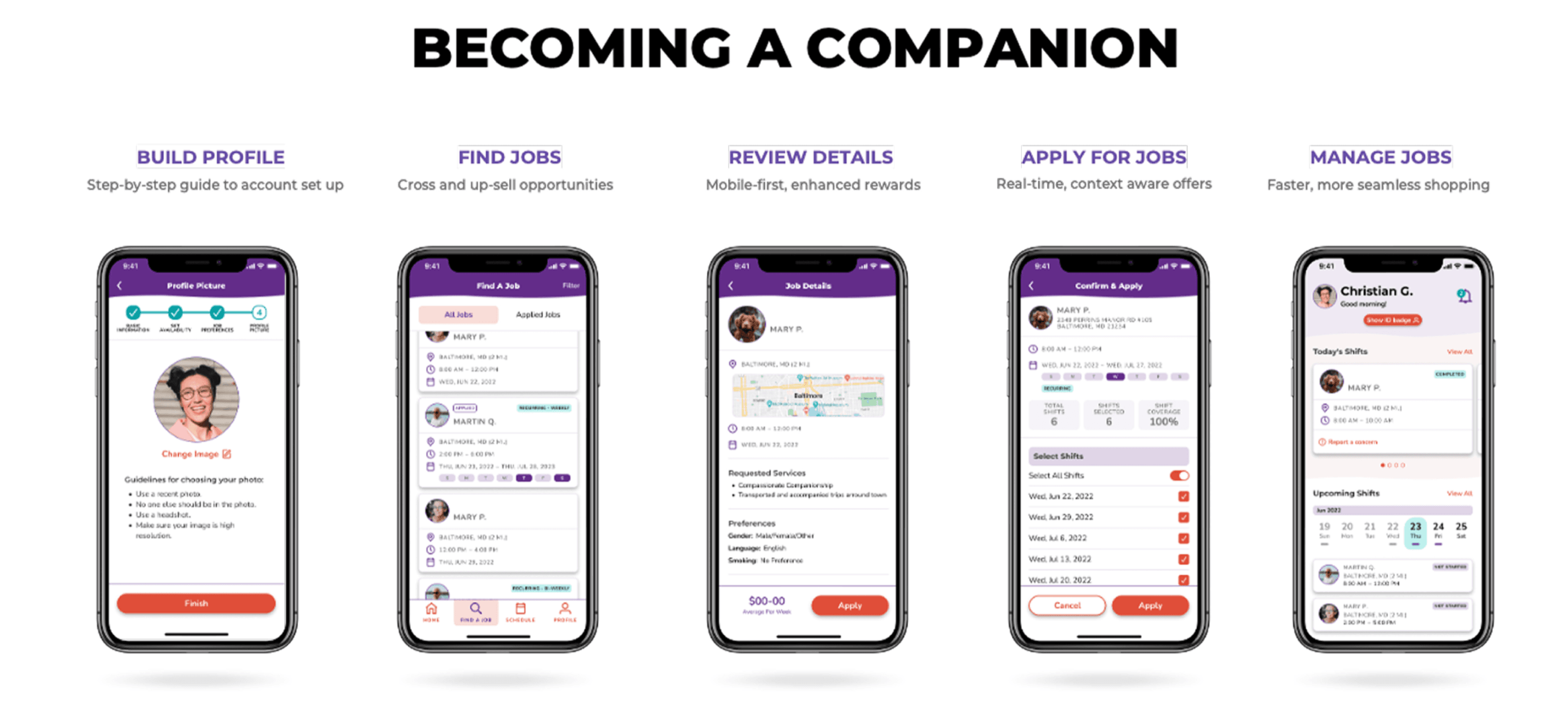
The experience was organized around four connected stages. Each stage helped caregivers understand their options, make informed decisions, and manage their work from onboarding through shift completion.
Onboarding — Build a Profile for Better Matching
A guided setup captured availability, working preferences, interests, and personal attributes. Clear progress indicators helped caregivers understand where they were in the process.
Job Discovery — Find and Review Suitable Opportunities
Caregivers could explore available work and review essential client, location, activity, and schedule details before deciding whether to apply.
Scheduling — Apply and Keep Work Organized
The experience connected job applications with availability and scheduling, helping caregivers distinguish between applied, upcoming, active, and previous work.
Shift Management — Complete Each Shift with Clarity
Today’s shift was placed prominently so caregivers could review details, start and end work accurately, access previous shifts, and find support when needed.
VALIDATION
Testing the Journey Before Handoff
Five critical flows were evaluated with users to identify comprehension issues, missing information, and moments of uncertainty. The findings informed refinements across onboarding, availability, job discovery, scheduling, and support.
- Participants found the first-time flow easy to navigate and understand.
- The introduction needed to explain the app’s purpose and key tasks.
- About You needed to follow Introduce Yourself for a more natural sequence.
- Multiple participants preferred travel time in minutes rather than distance in miles.
- Start and end dates were not immediately understood.
- An availability-status toggle during setup did not match participants’ expectations.
- The overall job-discovery and application flow made sense.
- Participants valued selecting individual shifts within a recurring series.
- Filters needed availability and a chosen location rather than the phone’s current location.
- Participants valued seeing today’s shift prominently on the home screen.
- The support action within the shift card was not noticed during testing.
- Report a Concern and SOS were interpreted as actions connected to a specific shift.
- Participants found the schedule screens simple and easy to understand.
- They valued seeing previous shifts and tracking hours worked.
- The existing hierarchy could be retained while other flows were refined.
OUTCOME AND LEARNING
A Validated Direction Ready for Handoff
The project produced a research-informed MVP direction and a connected mobile experience covering profile setup, opportunity discovery, applications, scheduling, and shift completion. The final handoff brought together prioritized requirements, tested wireframes, and documented recommendations for refinement.
What the work delivered
- Research synthesis across 11 interviews and 40 survey responses
- 16 wireframes covering five critical caregiver flows
- A prioritized MVP scope with future opportunities separated from launch needs
- Validation findings and clear design recommendations for handoff
What I learned
The strongest decisions came from treating matching, scheduling, and support as one service journey. Testing also showed that an experience can feel clear overall while still failing at small but important details such as labels, location settings, and support discoverability.
What should be measured next
Post-launch evidence was not available for this case study. The next phase should measure application completion, time to find a suitable opportunity, successful shift starts and endings, support usage, and caregiver satisfaction.
IF YOU GOT THIS FAR…